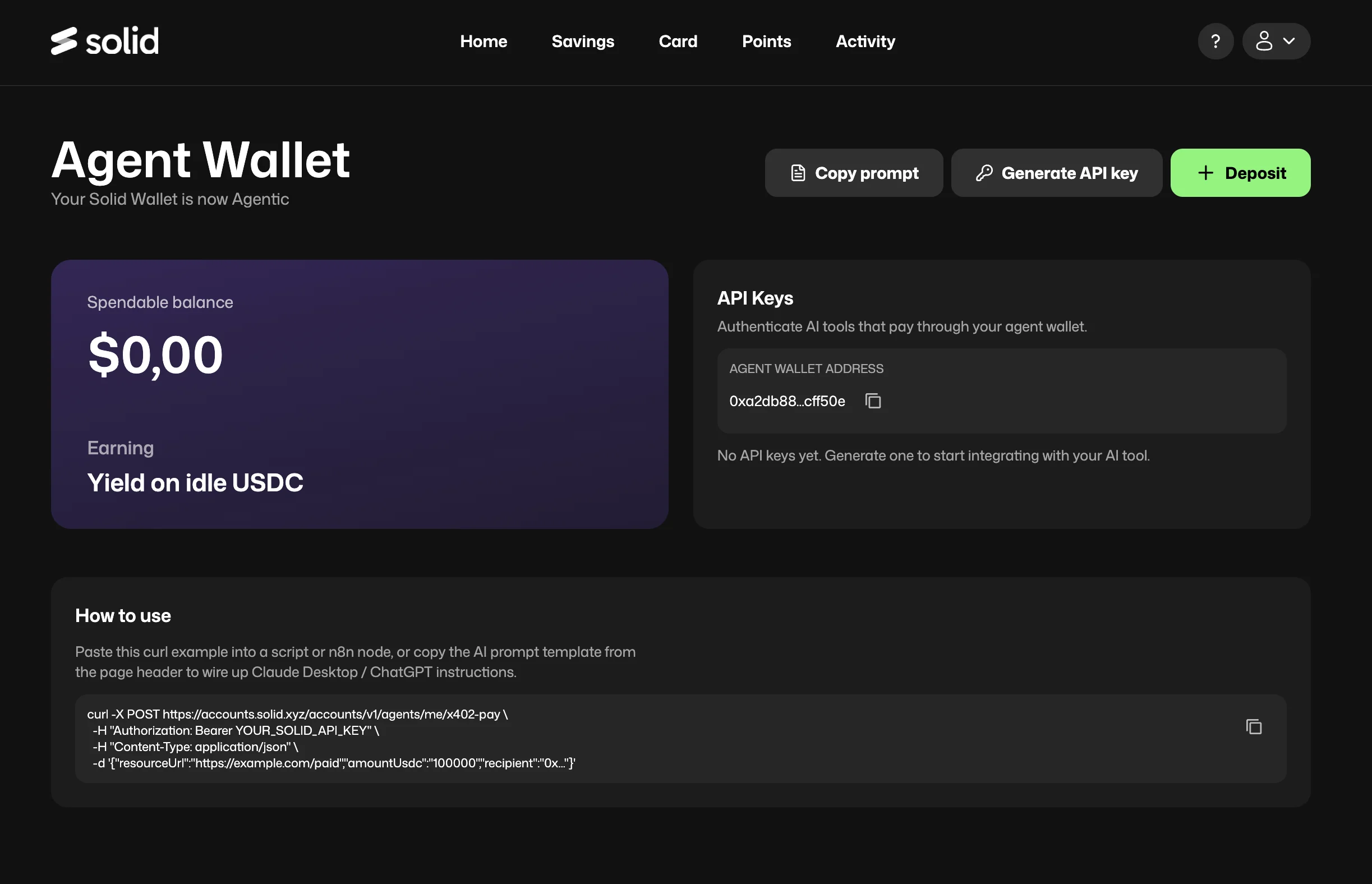
The Solid Agent Wallet turns your Solid account into an agentic payment layer. It gives AI agents - Claude, ChatGPT, or any autonomous system - a secure way to make payments on your behalf without ever touching your private keys. Instead of exposing your wallet credentials to an AI platform, you generate an API key from your Solid account. That key authenticates the agent and authorises it to spend from a separate, agent-controlled EOA inside your existing Solid wallet. You stay in control: you can revoke any key at any time, create separate keys for different agents or platforms, and your underlying funds continue earning yield on idle USDC while they sit in the wallet.
Image

How It Works

The Agent Wallet is a sub-account of your main Solid wallet, controlled by Solid’s Turnkey-based key infrastructure. The private key never leaves Solid’s custody and is never exposed to you or to the AI agent - only the API key is shared. This is the same model Solid uses for its smart wallet architecture, extended to support agentic payment flows. When an AI agent needs to make an x402 payment, it uses the API key to authenticate with Solid’s payment endpoint. Solid handles the on-chain settlement in USDC on Base - the agent gets the result, and your wallet balance is debited the cost of the API call. Key properties:
  • Private key is fully custodied by Solid - never exposed or exportable
  • API keys can be created, used, and revoked independently per agent or platform
  • Spendable balance is in USDC; idle funds earn yield automatically
  • Sub-wallet has its own on-chain address, visible and trackable

Setting Up Your Agent Wallet

1. Open the Agent section in Solid

Navigate to the Agent tab in your Solid app. You’ll see your Agent Wallet with its spendable balance, on-chain address, and any existing API keys.

2. Deposit funds

Click + Deposit to fund your Agent Wallet. Rather than transferring funds directly, the Agent Wallet is funded by borrowing against your Solid savings balance. Your savings principal stays in the vault and continues earning yield - only the borrowed USDC sits in the Agent Wallet ready for spending. This means your capital keeps working for you even while the agent draws on it for payments.

3. Generate an API key

Click Generate API key. Each key is labelled with its creation date and last-used date so you can track activity across agents. Create separate keys for Claude Desktop, ChatGPT, automation scripts, or any other agent you want to authorise independently.

4. Copy the prompt

Click Copy prompt to get a ready-made instruction block you can paste directly into Claude Desktop, ChatGPT, or any other AI client. The prompt tells the agent your wallet address, how to authenticate, and how to use the Fuse x402 payment endpoints - no manual configuration needed. \

Using with an AI Agent

Once your Agent Wallet is set up, paste the copied prompt into your AI client of choice. From there, you can instruct the agent in plain language:
  • “Get me the current Fuse network stats”
  • “Check the DeFi yield opportunities available on Fuse”
  • “What’s the balance and recent activity for wallet address 0x…?”
  • “Deploy a loyalty token for my business using the Fuse API”
The agent will handle endpoint discovery, payment via your Agent Wallet, and result retrieval - with no further action required from you. For developers integrating programmatically, the x402 payment endpoint is:
curl -X POST https://accounts.solid.xyz/v1/agents/me/x402-pay \

  -H "Authorization: Bearer YOUR_SOLID_API_KEY" \
 ...

Yield on Idle USDC

The Agent Wallet is funded through Solid’s “Borrow against savings” mechanism - meaning your savings principal never leaves the vault. It continues earning yield in the background while the borrowed USDC in your Agent Wallet is available for the agent to spend on API calls. This makes the Solid Agent Wallet meaningfully different from other agent wallet providers: rather than moving funds out of a yield-bearing position just to make micropayments, your capital stays productive the entire time. For teams or applications with large agent wallet balances, this compounds materially over time.

Security Model

No private key exposure. The underlying EOA private key is held by Solid’s Turnkey-based infrastructure and is never shown to users or shared with agents. This is the same model used for Solid’s main smart wallet - the key exists in custody but is never exported. Per-agent key isolation. Each API key is independent. If a key is compromised or an AI platform behaves unexpectedly, revoke that key immediately - other keys and your main Solid wallet are unaffected. Revocation at any time. Every API key has a Revoke button in the Agent Wallet interface. Revoking a key immediately cuts off that agent’s ability to make payments without affecting your balance or other keys. Spend visibility. Every payment made through your Agent Wallet is recorded and visible in your Activity feed, so you can audit exactly what each agent spent and when.

Agent Wallet vs. EOA Wallet

Solid Agent WalletDirect EOA Wallet
Private key exposureNever exposedMust be shared with agent
AI platform compatibilityAPI key accepted by all platformsSome platforms (incl. Claude) may block private key input
Per-agent access controlYes - separate keys per agentNo
RevocationInstant, per keyNot possible without rotating wallet
Yield on idle fundsYes - automaticNo
SetupOne-time in Solid appManual wallet funding required

Relationship to Fuse x402

The Solid Agent Wallet and Fuse x402 are independent but designed to work together. x402 is the payment protocol that Fuse APIs use to charge per request. The Agent Wallet is the funding layer that gives agents a safe, yield-bearing way to make those payments. You can use Fuse x402 endpoints with any USDC wallet on Base - the Agent Wallet is not required. But it is the recommended setup for users who want full security, per-agent control, and yield on idle balances. → SeeFuse x402 - Agentic Payments for the full list of available endpoints and how the payment protocol works.

Resources