> ## Documentation Index
> Fetch the complete documentation index at: https://docs.fuse.io/llms.txt
> Use this file to discover all available pages before exploring further.
# How to update Validator Metadata
# How to update Validator Metadata
Successfully running a node? Follow these steps to update your metadata to be displayed on [Staking App](https://console.fuse.io/staking "Staking App"):
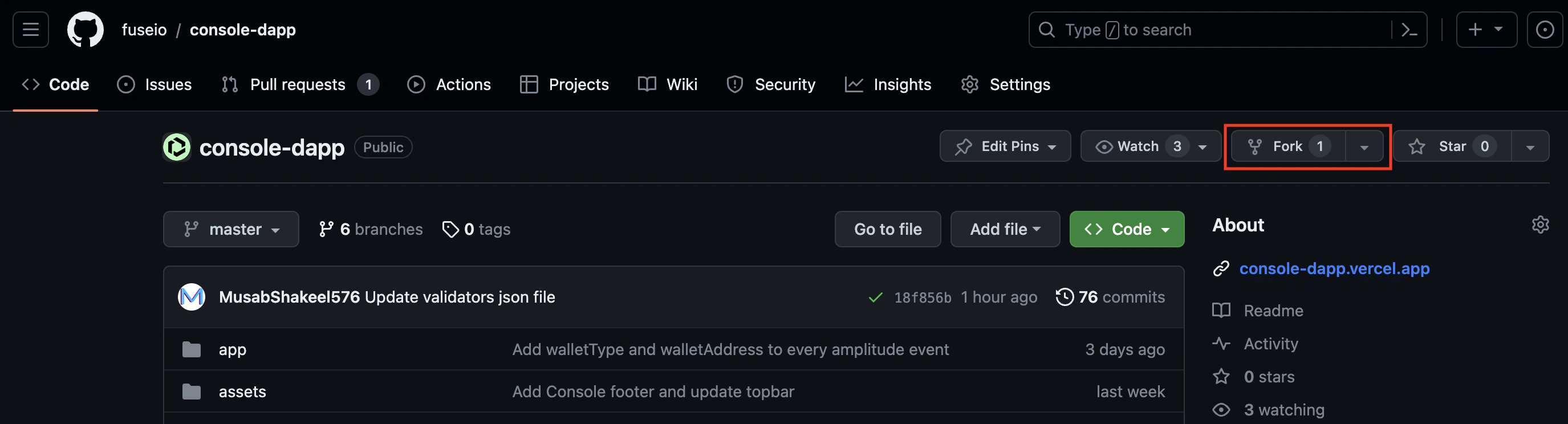
### Step 1: Fork the Repository:
Start by forking the [repository](https://github.com/fuseio/console-dapp) to your own GitHub account. This will create a copy of the repository under your account that you can work with.
 ### Step 2: Clone the Repository:
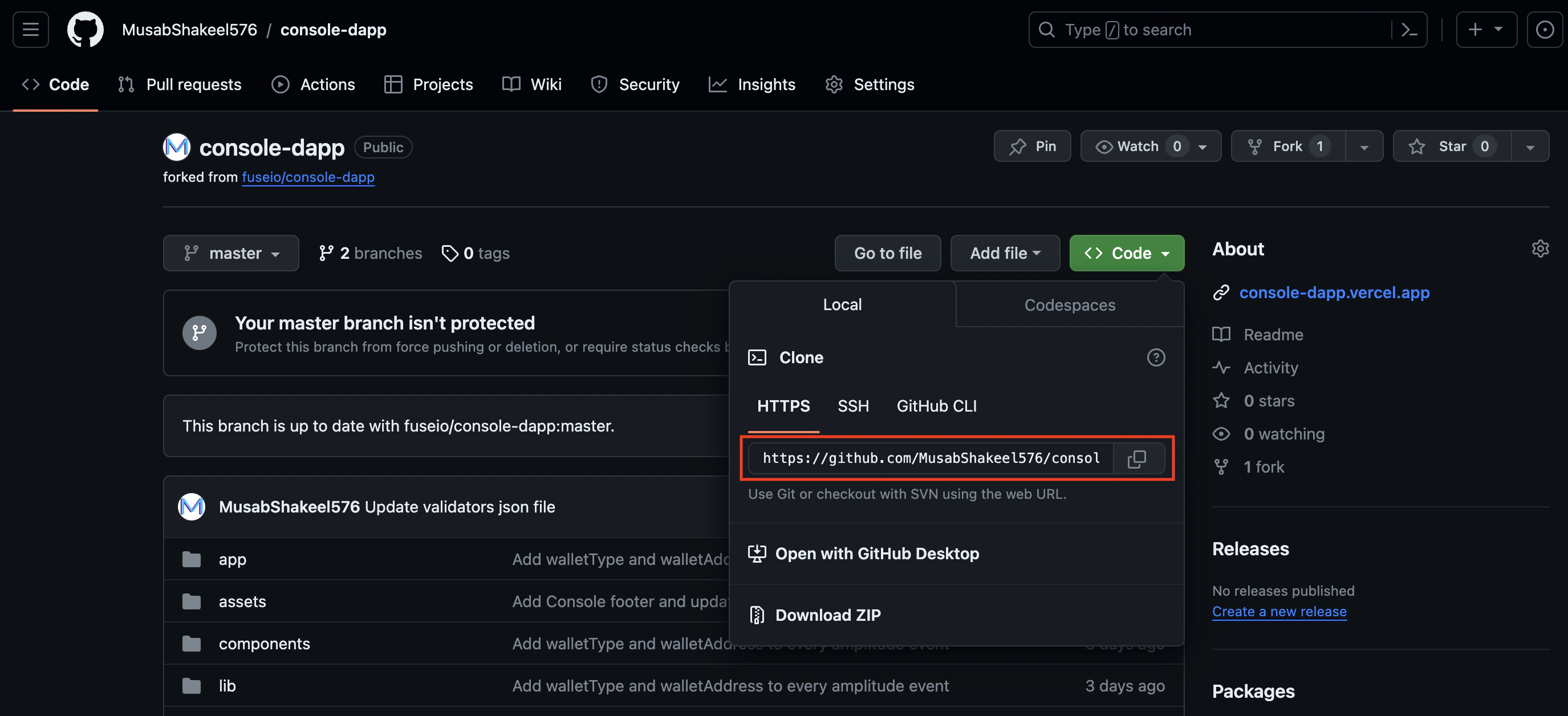
Once you have forked the repository, clone it to your local machine using a Git client. This will create a local copy of the repository that you can modify.
To clone the repository run this command in your terminal:
`git clone `
### Step 2: Clone the Repository:
Once you have forked the repository, clone it to your local machine using a Git client. This will create a local copy of the repository that you can modify.
To clone the repository run this command in your terminal:
`git clone `
 ### Step 3: Create a New Branch:
Create a new branch in your local repository to work on the changes. It's recommended to create a branch specifically for this update, such as `update--data(image/website/description/name)`
To create a new branch, navigate to the cloned repository and run
`git checkout -b `
### Step 4: Make the Necessary Changes:
Navigate to `validators/validators.json`
* If you want to update your metadata, search for your node address, and make changes to the attribute next to it, currently 4 attributes are supported:
1. **name**:- Name of your validating node
2. **image**:- Location of your node's image, all images are located in `public/logos` you are required to update/add the logo in the same directory, and your image attribute should look like `logos/` , The recommended image size is\*\* 64px\*64px or 128px\*128px in jpg/png\*\* format.
3. **website**:- the website for your validating node
4. **description**:- description to be displayed for your node
* If you are adding a new node, add an entry at the **end** of the JSON object with your node's address as the key and follow the above instruction.
Please note that all the attributes are **optional**, but we encourage you to provide all the details as this increases trust among users.
### Step 5: Commit and Push the changes:
Once you have made the necessary changes, commit them to your local branch. First, add all the files that you have changed and then provide a meaningful commit message that describes the purpose of the changes. for eg
```shell theme={null}
git add
git commit -m "[VALIDATOR] Update Voltage Image"
```
Push the changes from your local branch to the corresponding branch in your forked repository on GitHub.
```shell theme={null}
git push origin
```
### Step 6: Open a Pull Request:
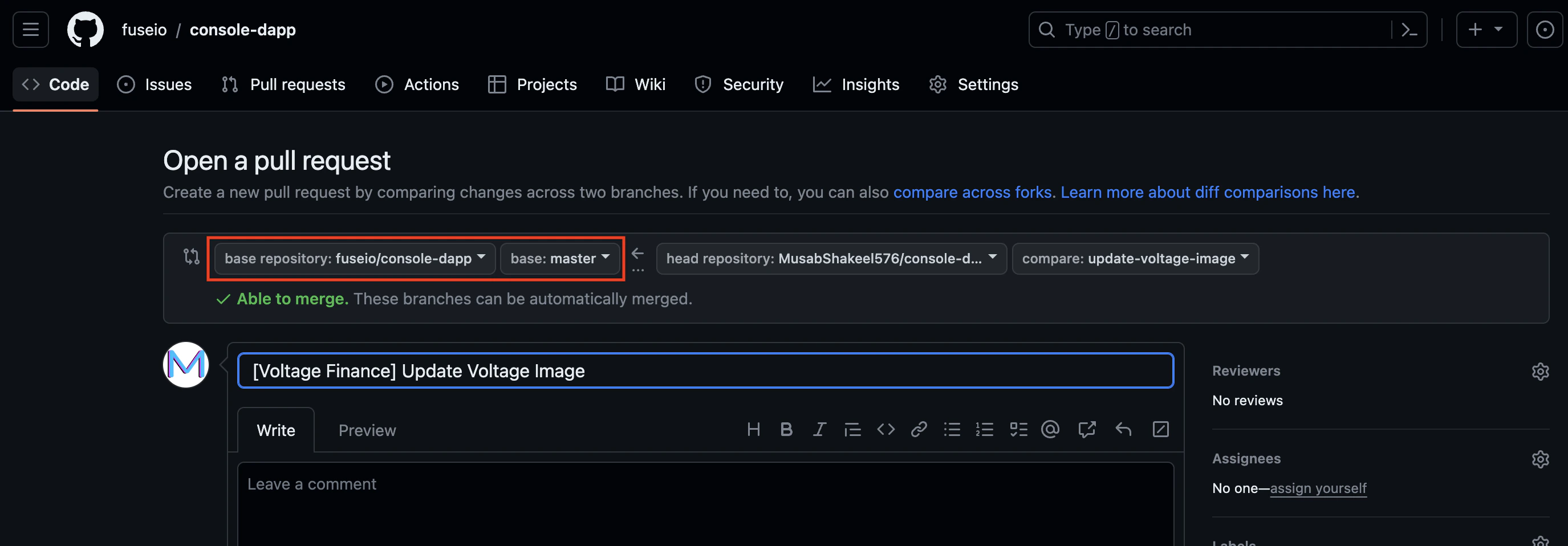
On the [original repository](https://github.com/fuseio/console-dapp) page, you should see an option to compare and open a new pull request. Click on it, and select your branch as the source branch and the target branch as `fuseio/console-dapp master` where we want it merged, provide a short description, and ask for a review. If the review is a success, your PR will be merged and changes will be live within a few minutes of merging.
### Step 3: Create a New Branch:
Create a new branch in your local repository to work on the changes. It's recommended to create a branch specifically for this update, such as `update--data(image/website/description/name)`
To create a new branch, navigate to the cloned repository and run
`git checkout -b `
### Step 4: Make the Necessary Changes:
Navigate to `validators/validators.json`
* If you want to update your metadata, search for your node address, and make changes to the attribute next to it, currently 4 attributes are supported:
1. **name**:- Name of your validating node
2. **image**:- Location of your node's image, all images are located in `public/logos` you are required to update/add the logo in the same directory, and your image attribute should look like `logos/` , The recommended image size is\*\* 64px\*64px or 128px\*128px in jpg/png\*\* format.
3. **website**:- the website for your validating node
4. **description**:- description to be displayed for your node
* If you are adding a new node, add an entry at the **end** of the JSON object with your node's address as the key and follow the above instruction.
Please note that all the attributes are **optional**, but we encourage you to provide all the details as this increases trust among users.
### Step 5: Commit and Push the changes:
Once you have made the necessary changes, commit them to your local branch. First, add all the files that you have changed and then provide a meaningful commit message that describes the purpose of the changes. for eg
```shell theme={null}
git add
git commit -m "[VALIDATOR] Update Voltage Image"
```
Push the changes from your local branch to the corresponding branch in your forked repository on GitHub.
```shell theme={null}
git push origin
```
### Step 6: Open a Pull Request:
On the [original repository](https://github.com/fuseio/console-dapp) page, you should see an option to compare and open a new pull request. Click on it, and select your branch as the source branch and the target branch as `fuseio/console-dapp master` where we want it merged, provide a short description, and ask for a review. If the review is a success, your PR will be merged and changes will be live within a few minutes of merging.
 For live support, contact us on [Telegram](https://t.me/fuseio) or [Discord](https://discord.gg/tz7ArR). Good luck, and happy validating!